
Open source • MIT or Apache-2.0

Simulate real backend behavior across REST, gRPC, GraphQL, WebSockets & SMTP

Start with open source in minutes, then scale to team and enterprise workflows with realistic services, intelligent synthetic data, and admin-grade controls.

Compare MockForge with WireMock and MockServer to see where multi-protocol simulation and realism-first workflows differ.

# Install (example) $ cargo install mockforge-cli
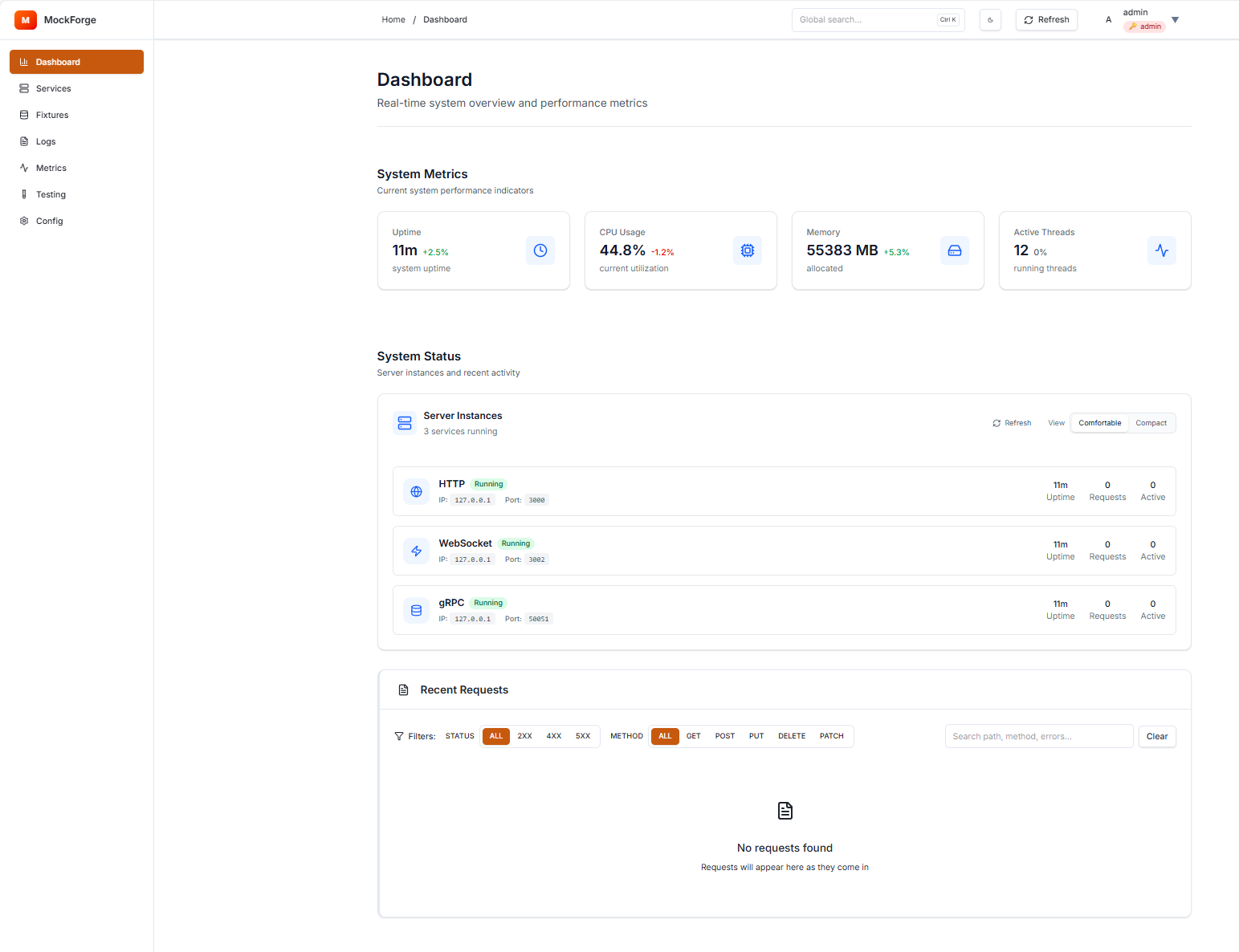
MockForge Admin UI screenshot

Features developers care about

Everything you need to simulate complex services and ship faster, without waiting on real backends.

Multi‑Protocol

Mock HTTP REST, gRPC, GraphQL, WebSocket, and SMTP endpoints with a unified interface. Includes HTTP Bridge for automatic gRPC-to-REST conversion.

Advanced Data Synthesis

AI-powered intelligent data generation with RAG, smart field inference, deterministic seeding, relationship awareness, data drift simulation, and template tokens like {{uuid}} and {{faker.email}}.

Latency & Fault Injection

Operation‑aware latency/failure profiles to test real‑world conditions.

Record & Replay

Capture live traffic and replay scenarios to debug and benchmark.

Extensible Plugins

Add custom generators, data sources, and overrides with a clean plugin system.

Modern Admin UI

Web‑based interface for managing servers, overrides, and metrics.

Request Validation

Validate incoming requests against OpenAPI specs with deep schema resolution, supporting path, query, header, cookie, and body parameters.

AI Event Streams

Generate narrative-driven WebSocket events for real-time testing scenarios.

End-to-End Encryption

Enterprise-grade security with AES-256/ChaCha20 encryption for sensitive configurations.

Why teams adopt MockForge

Built for faster frontend/backend parallelization and safer integration testing under real-world conditions.

Developer workflow

Faster parallel delivery

Frontend and backend teams unblock each other with realistic mocks instead of waiting on live services.

Risk reduction

State-aware test confidence

Scenario switching and failure profiles expose retry/fallback behavior before integration surprises hit production.

Adoption path

Open-source first

Start with OSS workflows, then layer team and enterprise support as complexity grows.

How it works

  1. 1

    Define your API & rules

    Describe endpoints and schemas. Configure latency/failure profiles and overrides per operation.

  2. 2

    Generate realistic data

    Use built‑in tokens ({{uuid}}, {{now}}, etc.) or plug in custom generators.

  3. 3

    Run & iterate

    Start the mock server, inspect requests in the Admin UI, and fine‑tune behaviors as you build.

# Quick start (example)
$ mockforge init
✔ Created mockforge.yaml

# Add an endpoint override
$ mockforge add /users/{id} --status 200 \
  --body '{ "id": "{{uuid}}", "name": "{{name}}" }'

# Run server
$ mockforge serve --port 8080
Listening on http://localhost:8080

Choose your path

Whether you're evaluating open source, scaling team workflows, or planning enterprise rollout, start from the path that matches your goals.

Open Source Builder

Install the CLI, run local mocks, and integrate into CI quickly.

Get the repo →

Product Team

Use docs + workflows to standardize realistic mocks across frontend, backend, and QA.

Read implementation docs →

Enterprise Program

Need support, roadmap alignment, or deployment guidance? Start a conversation.

See plans and pricing →

Compare popular alternatives

Start with the side-by-side guides if you are evaluating MockForge against established mocking tools.

“MockForge let our frontend team build weeks faster by simulating gRPC services with realistic data.”

— Engineer, Early Adopter

Join the beta

Get early access to cloud-hosted mocks. No spam, just launch updates.

No credit card required. Unsubscribe anytime.

Ready to mock any API?

Sign up free, deploy your first mock, and start shipping faster in under 5 minutes.

FAQ

Is MockForge open source?
Yes. It’s open‑source and permissively licensed. Contributions are welcome.
Which protocols are supported?
HTTP/REST, gRPC, and WebSockets out of the box. More via plugins.
Can I use it in CI?
Absolutely. Spin up MockForge alongside your tests to provide stable, realistic endpoints.
Does it support record/replay?
Yes. Capture live traffic, store fixtures, and replay them deterministically.